 Software supply-chain security desk

SBOMs, CVEs, containers and licences in one risk register — free, in your browser.
Provenance is a supply-chain security desk for the software you ship. Collect SBOMs, lockfiles, container images, packages, repositories, advisories, domains, OAuth integrations and media files in one project; Provenance runs twelve usefulweb.site security tools on them, merges the results into one findings register with CISA KEV and EPSS priority, and turns it into a release gate, a fix plan, comparisons over time and a printable report. Projects stay in your browser; only the tool inputs go to the usefulweb.site API.
Screenshots
 Risk dashboard with release gate, severity and findings per asset
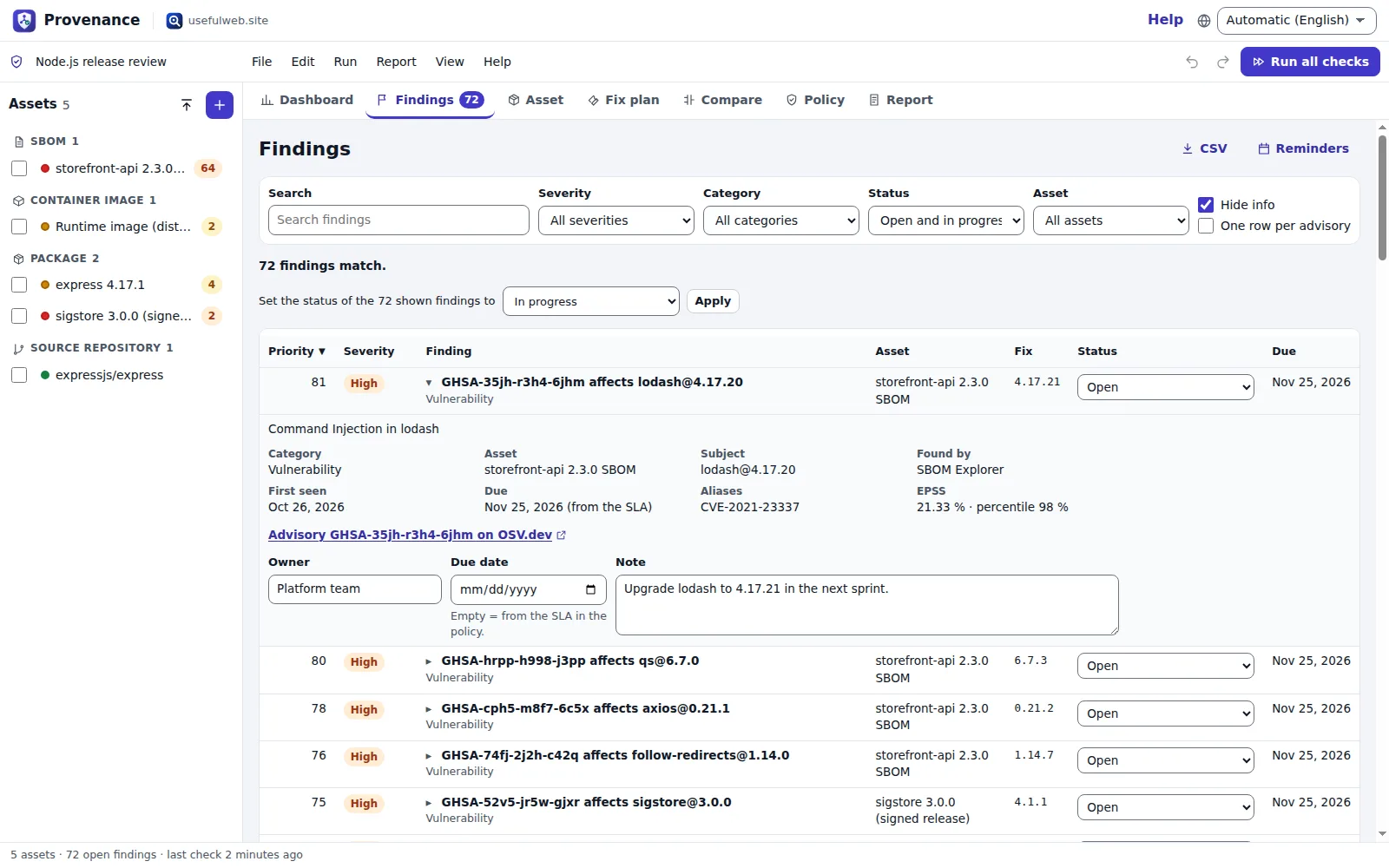 One findings register across all tools, with triage
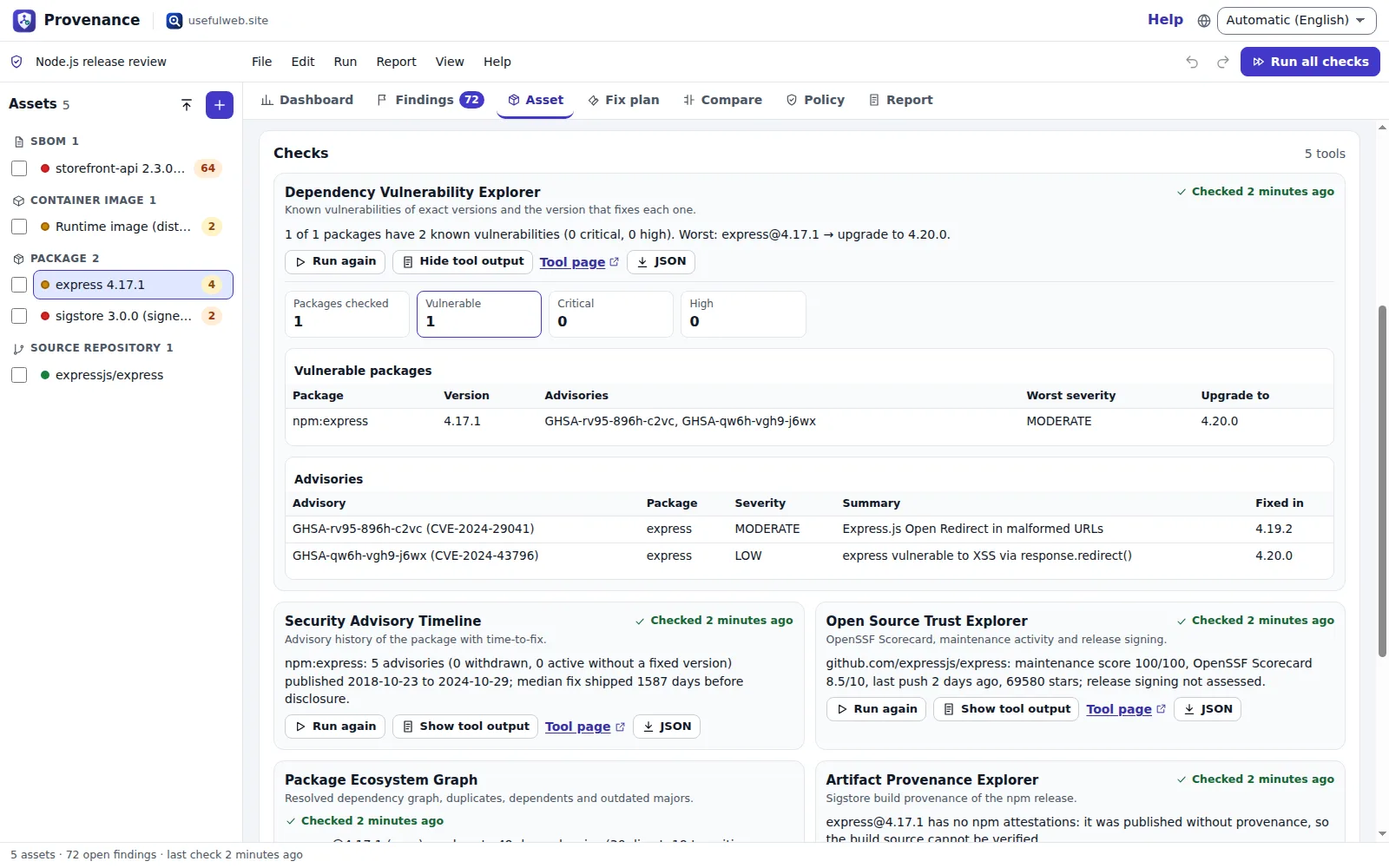 Each asset runs every matching tool
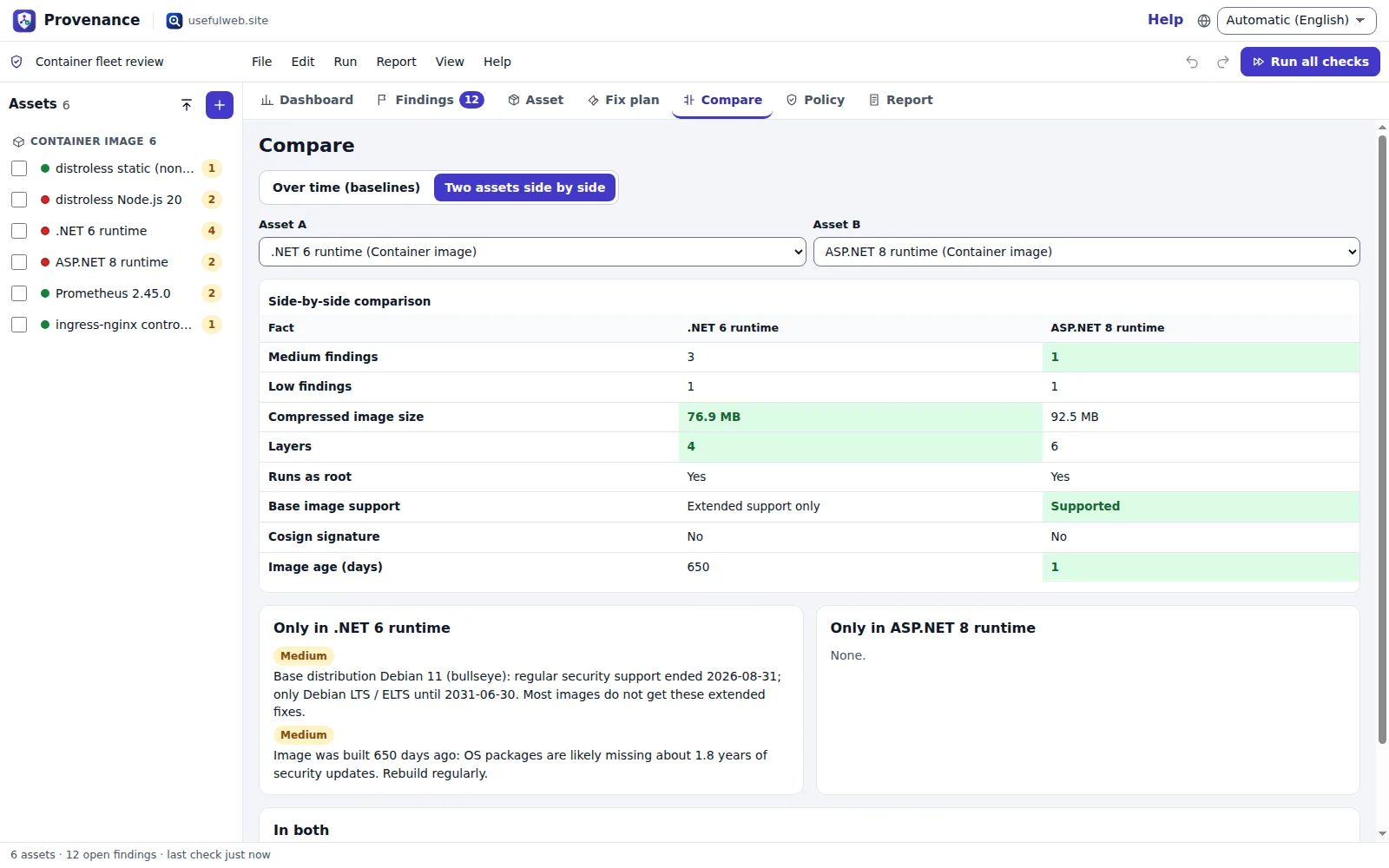 Scenario A/B: compare two images or two package versions
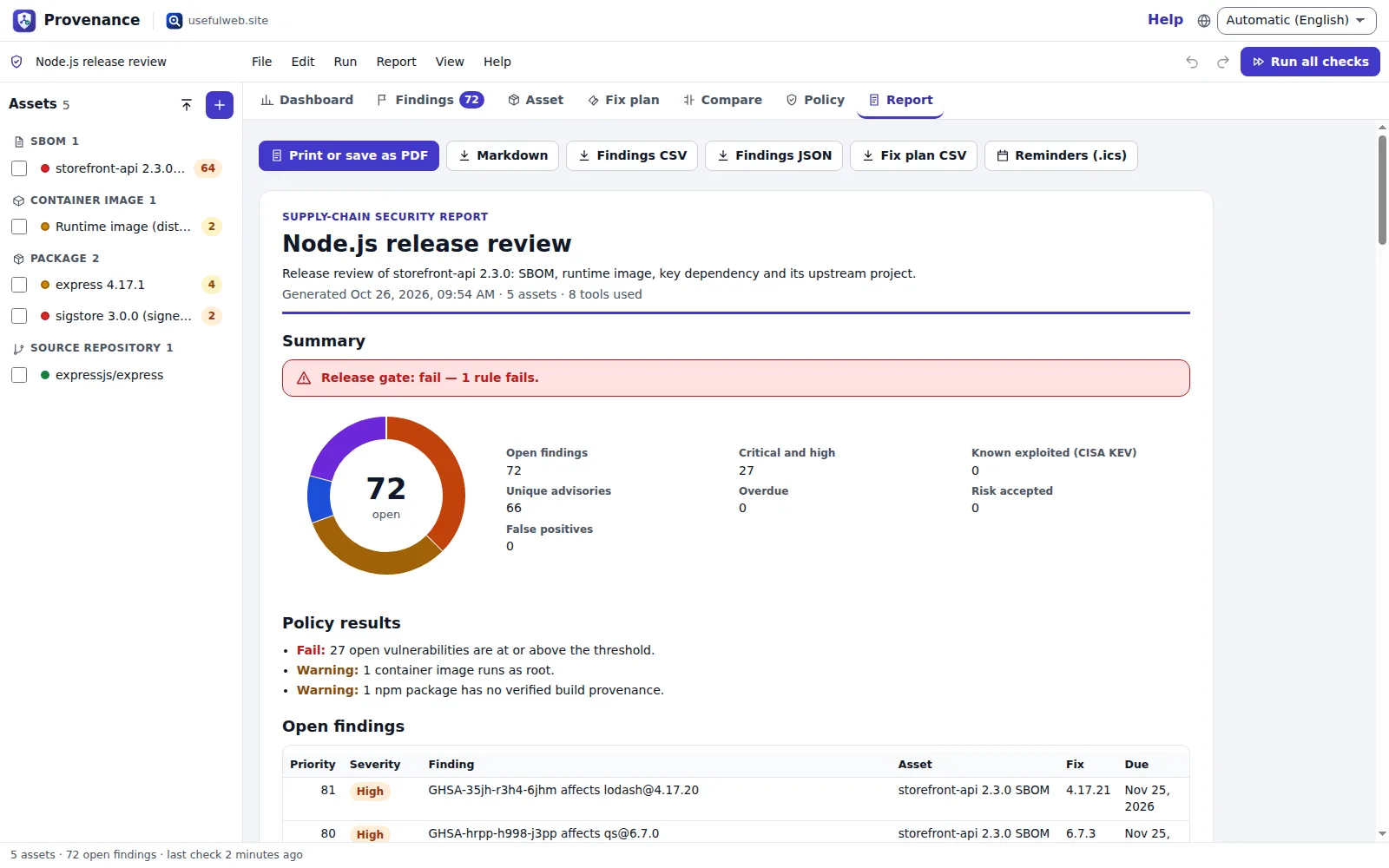 Consolidated report, ready to print or save as PDF
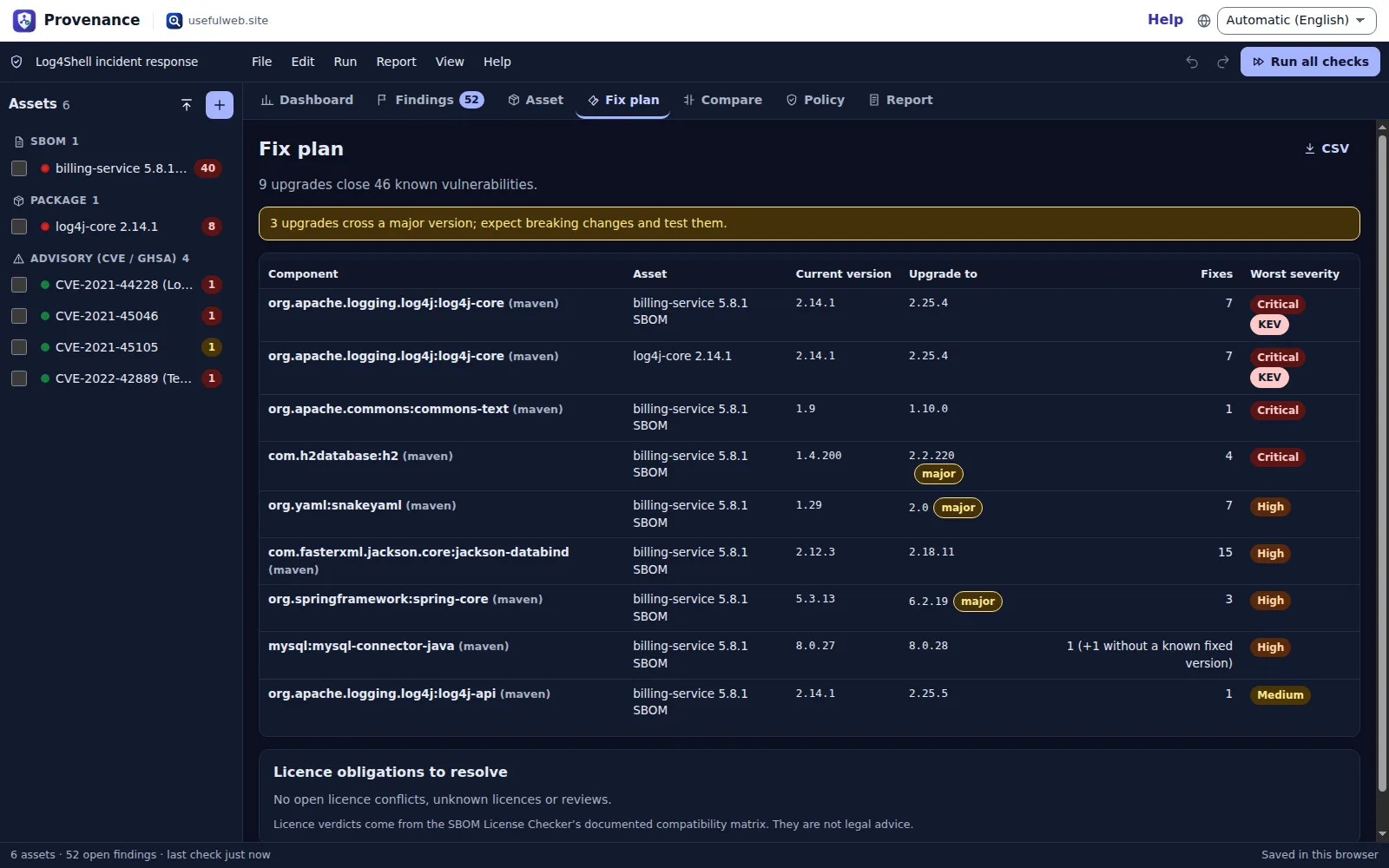 Fix plan in the dark theme
Features
One inventory for everything you ship
SBOMs (CycloneDX, SPDX), lockfiles and manifests, container images, packages, GitHub repositories, CVE/GHSA ids, domains, OAuth consent links and media files — added one by one, pasted as a list or opened from files.
Combined checks per asset
Each asset runs every tool that fits: an SBOM gets the SBOM Explorer and the licence checker, a package gets vulnerabilities, advisory history, trust signals, dependency graph and npm build provenance — batch runs with progress, retry and rate-limit handling.
Unified findings register
Vulnerabilities, licence conflicts, container, configuration, provenance, trust, OAuth and Content Credentials issues in one sortable, filterable table — or one row per advisory across all assets.
KEV and EPSS priority
Enrich the most important advisories with CISA Known Exploited Vulnerabilities and EPSS probabilities; priority = severity + exploitation evidence, so known-exploited issues rise to the top.
Triage with owners and deadlines
Status (open, in progress, risk accepted, false positive, fixed), owner, note and due date per finding; due dates follow your SLA per severity from the first time a finding was seen.
Release gate policy
Rules for severity thresholds, KEV, licence conflicts, root containers, end-of-life base images, missing provenance, OpenSSF Scorecard, web grade, OAuth risk and overdue findings — each fails, warns or is off.
Fix plan
One upgrade per vulnerable component with the version that closes all its known advisories, major-version warnings and the licence and configuration fixes that remain.
Baselines and drift over time
Save baseline snapshots and see new, resolved and re-rated findings since then, with a trend chart across all baselines.
Scenario A/B comparisons
Two SBOM versions, two base images or two candidate packages side by side: size, root user, base support, Scorecard, advisories, licence conflicts and which issues only one of them has.
Risk dashboard
Gate status, open findings by severity and by asset, top priorities, coverage and freshness of every check, and the next steps worth doing.
Consolidated report
A printable report (save as PDF) with summary, policy results, findings, fix plan and assets — plus Markdown, CSV, JSON and SVG/PNG chart exports.
Deadline reminders
Download open findings’ due dates as an .ics calendar file with a reminder the day before.
Run history per check
Every check keeps its last six results with timestamps, so you can see how a package, image or domain changed between runs and whether a stored result is out of date.
Works with other apps
Open the findings table, report or findings JSON in another premium app, and receive SBOMs, lockfiles or asset lists from other apps through the App Bridge.
Local-first projects
Autosave and recent projects in your browser, project files, share links, undo/redo and optional Google Drive saving; stored results stay readable offline.
API and MCP
All twelve tools are available on the app host’s JSON API and MCP server, and agents can build a project file from the documented schema and open it with a link.


Templates
Start from a ready-made project and change it to fit.
Node.js release review
An Express API before release: its CycloneDX SBOM, the runtime base image, the framework package and its repository — vulnerabilities, licences, provenance and trust in one pass.
Python service audit
A Django reporting service with an SPDX 2.3 SBOM and the matching requirements.txt, plus the requests package history and a tracked CVE.
Log4Shell incident response
Track CVE-2021-44228 and its follow-up CVEs, check a Java service SBOM from that time and the log4j-core package history — with CISA KEV and EPSS priority.
Container fleet review
Six public images side by side: root user, base distribution support, size, signatures and history — compare two base images with Compare → Two assets.
Choosing a web framework
Due diligence before adopting a dependency: compare Express and Fastify on vulnerabilities, advisory history, dependency graph, OpenSSF Scorecard and npm provenance.
Third-party access review
OAuth consent requests of three integrations, a shop domain’s web configuration and a signed press image — uses the tools’ documented sample inputs.
Built-in tools
Provenance uses these tools. Each one also has its own page and works on its own, in the browser, through the JSON API and through MCP.
- SBOM ExplorerOpen a CycloneDX or SPDX SBOM: components, licences, dependency tree and known vulnerabilities.
- SBOM License CheckerCheck SBOM licences: SPDX expressions, copyleft class and conflicts with your project licence.
- Dependency Vulnerability ExplorerKnown vulnerabilities in your dependencies, and the version that fixes each one.
- Container Image ExplorerInspect a container image: platforms, layers, base image, root user, labels and cosign signature.
- Package Ecosystem GraphWho depends on what: resolved dependency graph, duplicates and the blast radius of breaking changes.
- Security Advisory TimelineDisclosures, affected ranges, fixes and withdrawals for a package on one timeline, with time-to-fix.
- Open Source Trust ExplorerIs this open-source project maintained and trustworthy? Scorecard, activity and provenance.
- Artifact Provenance ExplorerVerify npm build provenance: Sigstore signature, transparency log, source repo and commit.
- CVE Relationship GraphOne CVE or GHSA as a graph: aliases, affected packages, fixed versions, KEV status and EPSS.
- Security Configuration ScannerPassive, graded check of a domain's TLS, security headers, DNS security and security.txt.
- OAuth Permission ExplorerWhat an OAuth consent request really allows: scopes, risky combinations and flow problems.
- C2PA Credentials InspectorRead C2PA Content Credentials in images and videos: actions, AI hints, signer and signature.
For AI agents
Provenance runs on a deterministic engine. The same functions are available as tools with a JSON API and MCP, so scripts and AI agents get exactly the results the app shows.
- SBOM Explorer – Open a CycloneDX or SPDX SBOM: components, licences, dependency tree and known vulnerabilities.
Tool page ·POST https://provenance.usefulweb.app/api/v1/tools/sbom-explorer/calculate· MCPsbom_explorer - SBOM License Checker – Check SBOM licences: SPDX expressions, copyleft class and conflicts with your project licence.
Tool page ·POST https://provenance.usefulweb.app/api/v1/tools/sbom-license-checker/calculate· MCPsbom_license_checker - Dependency Vulnerability Explorer – Known vulnerabilities in your dependencies, and the version that fixes each one.
Tool page ·POST https://provenance.usefulweb.app/api/v1/tools/dependency-vulnerability-explorer/calculate· MCPdependency_vulnerability_explorer - Container Image Explorer – Inspect a container image: platforms, layers, base image, root user, labels and cosign signature.
Tool page ·POST https://provenance.usefulweb.app/api/v1/tools/container-image-explorer/calculate· MCPcontainer_image_explorer - Package Ecosystem Graph – Who depends on what: resolved dependency graph, duplicates and the blast radius of breaking changes.
Tool page ·POST https://provenance.usefulweb.app/api/v1/tools/package-ecosystem-graph/calculate· MCPpackage_ecosystem_graph - Security Advisory Timeline – Disclosures, affected ranges, fixes and withdrawals for a package on one timeline, with time-to-fix.
Tool page ·POST https://provenance.usefulweb.app/api/v1/tools/security-advisory-timeline/calculate· MCPsecurity_advisory_timeline - Open Source Trust Explorer – Is this open-source project maintained and trustworthy? Scorecard, activity and provenance.
Tool page ·POST https://provenance.usefulweb.app/api/v1/tools/open-source-trust-explorer/calculate· MCPopen_source_trust_explorer - Artifact Provenance Explorer – Verify npm build provenance: Sigstore signature, transparency log, source repo and commit.
Tool page ·POST https://provenance.usefulweb.app/api/v1/tools/artifact-provenance-explorer/calculate· MCPartifact_provenance_explorer - CVE Relationship Graph – One CVE or GHSA as a graph: aliases, affected packages, fixed versions, KEV status and EPSS.
Tool page ·POST https://provenance.usefulweb.app/api/v1/tools/cve-relationship-graph/calculate· MCPcve_relationship_graph - Security Configuration Scanner – Passive, graded check of a domain's TLS, security headers, DNS security and security.txt.
Tool page ·POST https://provenance.usefulweb.app/api/v1/tools/security-configuration-scanner/calculate· MCPsecurity_configuration_scanner - OAuth Permission Explorer – What an OAuth consent request really allows: scopes, risky combinations and flow problems.
Tool page ·POST https://provenance.usefulweb.app/api/v1/tools/oauth-permission-explorer/calculate· MCPoauth_permission_explorer - C2PA Credentials Inspector – Read C2PA Content Credentials in images and videos: actions, AI hints, signer and signature.
Tool page ·POST https://provenance.usefulweb.app/api/v1/tools/c2pa-credentials-inspector/calculate· MCPc2pa_credentials_inspector
- MCP endpoint (Streamable HTTP):
https://provenance.usefulweb.app/mcp - Project file format (JSON Schema): https://provenance.usefulweb.app/project.schema.json
- OpenAPI description: /openapi.json · llms.txt · API & MCP
Build a project through the API, then open it in the app with a link to https://provenance.usefulweb.app/app#project=<base64url JSON>.
Import & export
Import
- Provenance project (.provenance.json)
- CycloneDX SBOM (JSON, XML)
- SPDX SBOM (JSON, tag-value)
- package.json, package-lock.json, requirements.txt, go.mod, Cargo.lock, composer.lock
- Asset lists (image references, npm:name@version, pkg: URLs, owner/repo, CVE/GHSA ids, domains)
- Images and videos for Content Credentials (up to 5 MB)
- Project link (#project=…)
Export
- Provenance project (.provenance.json)
- Findings CSV and JSON
- Fix plan CSV
- Markdown report
- Printable report (PDF via print)
- Calendar reminders (.ics)
- Severity and trend charts (SVG, PNG)
- Raw tool results (JSON)
Keyboard shortcuts
| Keys | Action |
|---|---|
| Ctrl + Enter | Run checks for the selected asset |
| Ctrl + Shift + Enter | Run all checks |
| Ctrl + S | Save project file |
| Ctrl + O | Open project file |
| Ctrl + Z / Ctrl + Y | Undo / redo |
| N | Add asset |
| I | Import assets (paste or file) |
| 1 … 7 | Dashboard, findings, asset, fix plan, compare, policy, report |
| / | Search findings |
| Delete | Delete the focused asset (in the asset list) |
| ? | Keyboard shortcuts (single-key shortcuts can be switched off there) |
Frequently asked questions
Is Provenance free, and where does my data go?
Yes, it is free and needs no account. The project (assets, results, triage) is stored in your browser and in files you save. When a check runs, its input — for example an SBOM, a package name or an image reference — is sent to the usefulweb.site API, and some tools look things up at OSV.dev, deps.dev, GitHub, container registries, CISA or FIRST.
Which tools does it combine?
SBOM Explorer, SBOM License Checker, Dependency Vulnerability Explorer, Container Image Explorer, Package Ecosystem Graph, Security Advisory Timeline, Open Source Trust Explorer, Artifact Provenance Explorer, CVE Relationship Graph, Security Configuration Scanner, OAuth Permission Explorer and C2PA Content Credentials Inspector. Each one also has its own page with a guide.
How is the priority of a finding calculated?
Severity gives a base (critical 100, high 75, medium 45, unrated 35, low 20, info 0); an advisory in the CISA Known Exploited Vulnerabilities catalog adds 40 and the EPSS probability adds up to 30. KEV and EPSS come from the CVE Relationship Graph when you enrich advisories.
Does it scan container layers for vulnerable OS packages?
No. The Container Image Explorer reads the manifest, config and signature tag: base distribution and its support status, root user, age, labels, history and secrets in build arguments. For CVEs in OS packages, run a layer scanner such as Trivy or Grype on the digest and import its SBOM.
Are the licence verdicts legal advice?
No. The SBOM License Checker classifies declared licences and applies a documented compatibility matrix against your project licence. Use the conflicts and reviews as a list of what to check with legal counsel.
Can I use it offline?
Stored results, the findings register, triage, policy, comparisons and all exports work offline. Running a check needs the usefulweb.site API; Provenance tells you when you are offline and runs nothing until you are back.
How do I share a review?
Save the project file (with all results), or copy a share link: the link holds assets, settings, policy and triage — not the results — and the recipient runs the checks again. Signed-in users with Google Drive connected can save to Drive.
Can an AI agent build a Provenance project?
Yes. The project format is documented at /project.schema.json; an agent can list assets (only format, version, name and assets are required) and open them with /app#project=<base64url JSON>. The twelve tools are available on the same host through the JSON API and MCP.
Limitations
What Provenance does not do (yet):
- Vulnerability data covers published OSV advisories for components with a versioned package URL; unlisted, vendored or OS-level packages are invisible unless the SBOM lists them.
- Container images are inspected from registry metadata only (no layer contents). Registries that refuse anonymous token requests from the server (for example Docker Hub, GitHub Container Registry or Amazon ECR Public in some environments) cannot be read; paste the manifest and config instead.
- Build provenance verification covers npm packages (Sigstore attestations); other ecosystems are not checked.
- Live web configuration scans are passive and only for domains you own or may test; pasted mode reviews headers and records you provide.
- Licence verdicts are a triage aid based on declared licences, not legal advice.
- Tool calls share the site’s rate limits; large batches run two at a time and wait when the API asks them to.
- Media files for Content Credentials are kept in the project up to 5 MB each and are not part of share links.
- The SBOM Explorer reads JSON SBOMs; CycloneDX XML and SPDX tag-value are read by the licence checker only.
Tutorials
Learn Provenance step by step.
- Your first supply-chain review in 5 minutesOpen the Node.js release template, run all checks, read the release gate and the dashboard, and find the first thing to fix. No account, nothing to install.Beginner 5 min
- Triage findings — status, owners, due dates and remindersWork through the findings register like a security team: filter and sort, read a finding, set status, owner and due date, mark accepted risks and export calendar reminders.Beginner 8 min
- Release gate and policy — decide whether a build can shipConfigure the policy rules (severity threshold, KEV, licences, root containers, end-of-life bases, provenance, Scorecard, web grade, OAuth risk, overdue) and read the pass, warn or fail verdict.Intermediate 8 min
- Compare over time and side by sideSave baselines and see what is new, resolved or re-rated after the next run, then compare two images or two package versions as an A/B scenario.Intermediate 10 min
- Import your own SBOMs, lockfiles and asset listsBring in CycloneDX and SPDX SBOMs, package-lock.json or requirements.txt, and long lists of images, packages, CVEs and domains in one paste — then run them as a batch.Beginner 7 min
- Reports, sharing and automation with the API and MCPPrint the consolidated report, export Markdown, CSV and JSON, share a project link, save to Google Drive, and let scripts or AI agents build projects and call the same twelve tools.Advanced 10 min
Ready to try it?
Other premium apps
-

Kerfwise
Cabinet & furniture CAD
Design cabinets and furniture, get cut lists, optimised sheet layouts, costs and drawings.
-

Kinetica
Robot motion studio
Simulate robot arms in your browser: kinematics, trajectories, collisions, program export.
-

Threadsmith
Embroidery digitizing studio
Draw or import artwork, turn it into stitches, export DST, PES, JEF or EXP files.
-

Ohmforge
Virtual electronics workbench
Draw a circuit, switch it on, and measure it with real-feeling bench instruments.
-

Twinworks
Factory digital twin & production simulation
Model a production line, simulate it and find the bottleneck — free, in your browser.
-

Agentlab
AI-agent & LLM workbench
Test an AI agent before release: permissions, traces, costs, citations and output checks.
-

Bundlekeep
Local project backup
Back up projects from every usefulweb app into one file, check it and restore any part.
-

Chainscope
Web3 investigation desk
Investigate transactions, bridges, contracts, DAOs and wallets in one case file.
-

Chartroom
Data & charts studio
Import data, chart it, run analyses and publish a report — one workspace, free.
-

Fieldday
Sports club & training organiser
Fixtures, brackets, ratings and training plans for your club — in one workspace.
-

Flipline
Drawing, storyboards & animation
A few drawings. A little life. Make a flipbook in your browser.
-

Hearth
Home & travel planner
Plan meals, chores, home care, a move and trips for your whole household in one place.
-

Keysmith
Crypto & secrets lab
Audit certificates, keys, TLS and passwords in one lab; secrets stay on your device.
-

Ledgerly
Household finance & life-admin desk
Budgets, bills, subscriptions, loans, contracts and deadlines on one private desk.
-

Lumina
Photo editor & image toolkit
Bring out what you saw. A free photo studio, right in your browser.
-

OBSCURIQ
OSINT case desk
Organize public-source research: cases, a research log, pivots and indicators.
-

Opsdeck
Developer & ops workbench
One deck for CI failures, cron, traces, k8s events, API diffs, query plans and Terraform.
-

Pageboard
Website inspiration boards
Collect website references, sort them with tags and arrange them on a moodboard.
-

Panelcraft
Comic books & figure references
Shape a page. Arrange a book. Give your story a voice.
-

Paperwell
Document studio: PDFs, OCR, redaction, forms & contract reading
Your paperwork in one dossier: PDF tools, OCR, redaction, forms and contract reading.
-

Proofline
Math notebook
Solve, graph, test and visualise in one notebook — with data, findings and a report.
-

RavingDesk
Paper trading workspace
Practise trading on paper: orders, ledger, risk, exposure and journal. No real money.
-

Reelcraft
Audio, video & image batch studio
Audio, video & image batch studio: cut, convert, compress, subtitle, reframe
-

Renderloom
3D scene & material studio
Shape a scene. Find its light. Keep every idea editable.
-

Signalhouse
Website & internet infrastructure inspector
Inspect DNS, TLS, mail, CDN and routing of all your domains — and see what changed.
-

Tonegrid
Tone matrix & beat sequencer
Light up squares to build looping melodies and beats, then arrange them into songs.